AI footage cutout
Effortlessly transform your videos with our AI Footage Cutout tool for lightning-fast and hyper-accurate footage extraction, allowing you to mask and cut out objects in seconds without complicated setups.
Trusted by over 0.5 Million users worldwide
Adopted by influential creators and valued by users from global organizations










Three Simple Steps
No installations. No greenscreen. Just a few clicks.
- Upload
Drag and drop your video file. We handle the rest.
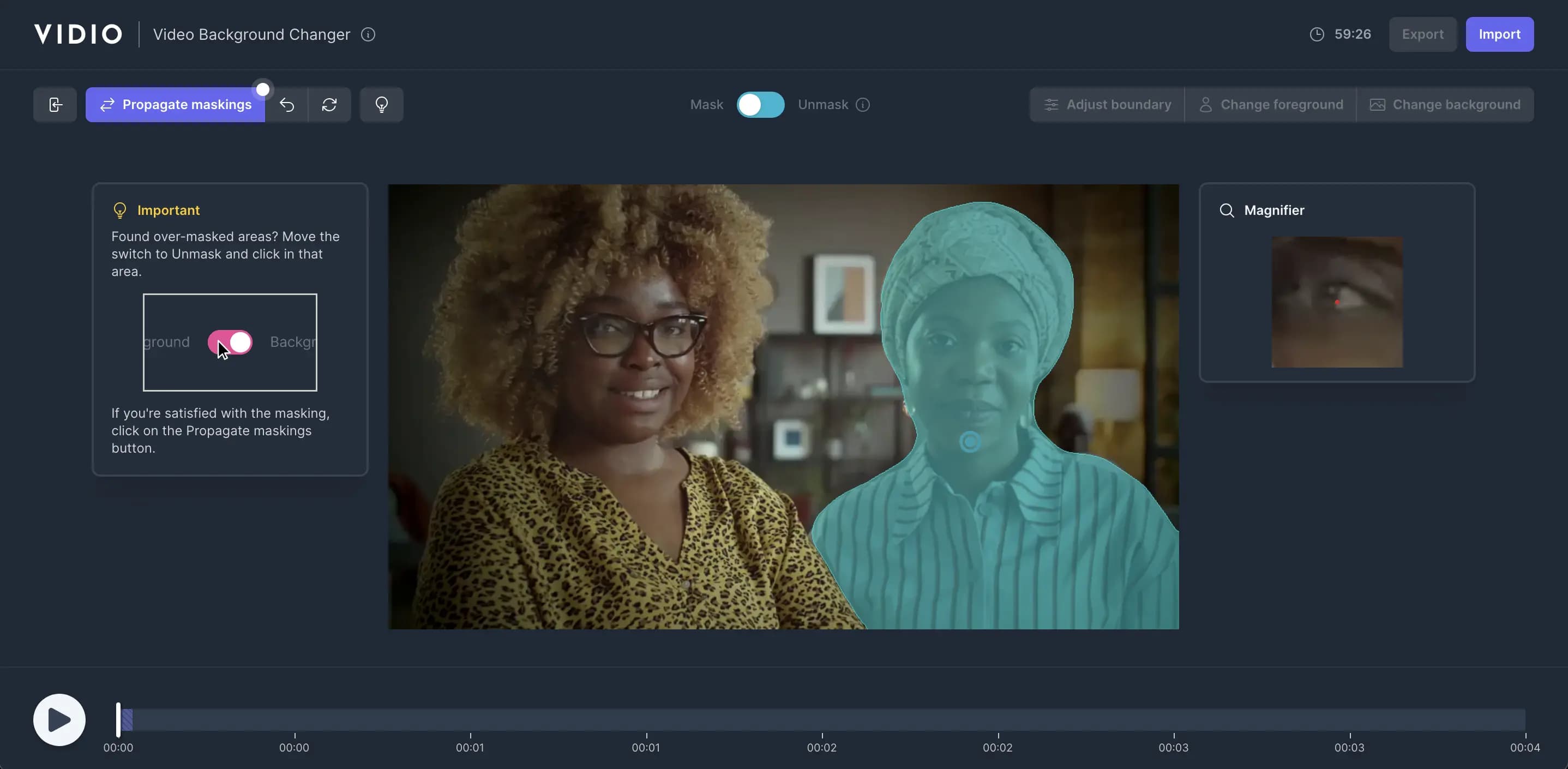
- Click to Mask
Click inside objects to mask in your video.
- Propagate
Click the Propagate button for transparent backdrops.
Why Choose Us
Simple, Fast, and Accurate
Cut out footage effortlessly with our intuitive AI tool. No greenscreen required.
- Easy to Use
- No installations or learning curve. Cut out footage with just a few clicks.
- Lightning-Fast
- Leverage GPU infrastructure and cutting-edge web tech for efficient results.
- Hyper-Accurate
- Powered by state-of-the-art AI algorithms for unmatched precision.
Mask any object and cut out it in seconds
Our AI video editor allows you to mask any object in your video and cut it out in seconds.





Empower Your Videos with Advanced Footage Cutout Tools
- 1. 4K Export
- Deliver stunning visuals with high-resolution 4K exports, perfect for professional-grade projects.
- 2. Transparent Background Export
- Export your scenes with a transparent background in ProRes or GIF format for seamless integration into other media.
- 3. Automatic Background Remover
- Instantly remove backdrops from your videos using advanced AI-powered precision tools.
- 4. Click-Based Foreground Extraction
- Easily isolate foreground objects with just a few clicks, saving time on complex masking tasks.
- 5. Background Replacement
- Replace backdrops effortlessly with custom images or a selection of preset designs to fit your creative vision.
- 6. Blur Foreground Objects for Privacy
- Protect sensitive information by blurring selected objects in the foreground with adjustable levels of discretion.
- 7. Blur Background for Foreground Focus
- Direct audience attention by blurring the backdrop, emphasizing your subject in every frame.
- 8. Object Highlighting with Background Filters
- Make your subject stand out by applying subtle or dramatic filters to the backdrop for a captivating effect.
Recommended by top media and bloggers.





Frequently Asked Questions
- How does the AI footage cutout tool work?
Our tool uses AI to create a mask based on your clicks, isolating the foreground object and making the background transparent across all frames.
- What video formats do you support?
We support a variety of formats including GIF, MP4, MOV, MPG, WEBM, and MPEG.
- Is there a file size or duration limit?
Yes, there is a maximum file size limit of 3GB for videos that can be processed. For more information, please visit the pricing page.
- Is the tool free?
We offer a free option with limited features. Premium options are available for more advanced features and longer videos.
- Is the process automated?
It's semi-automated. AI handles the removal based on your initial click, giving you control over the final result.
Discover More
Related Tools
Related Articles
Loved by content creators worldwide.
Edit like a pro in a minute.
Still not sure? Just upload your video and experience professional editing can be fun.